Guide to Fixing Driver Installation Issues on Dareu EM901x
22/11/2023
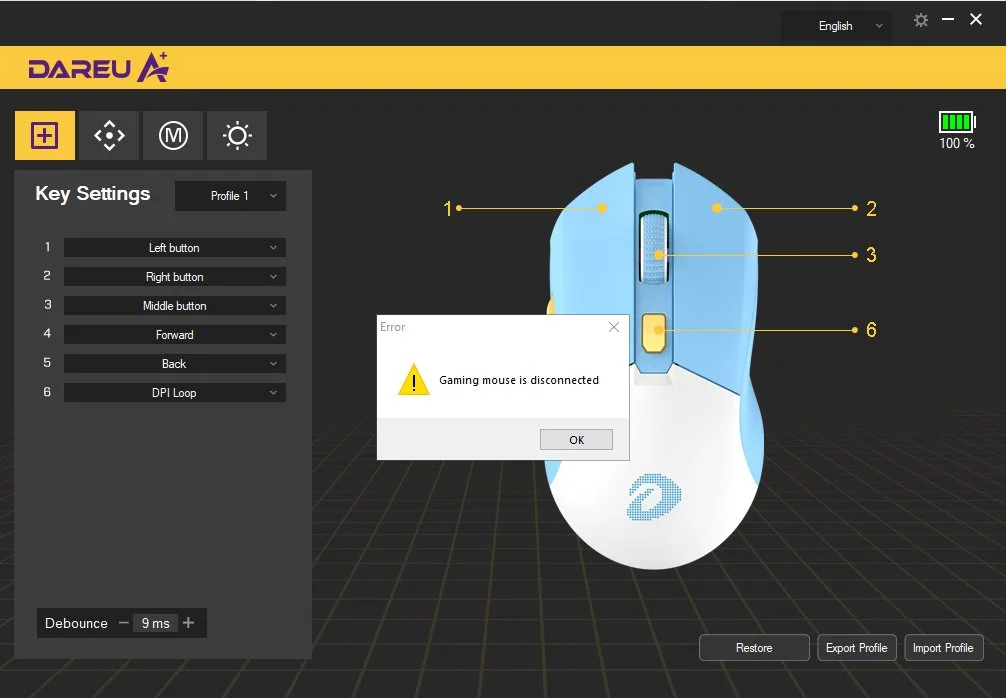
Recently, Dareu has received many inquiries from customers about difficulties in installing the driver for the EM901x product.
1. Symptoms
After installing the driver and turning it on, a 'Disconnected' message appears, preventing the driver from being used.
2. Cause
Incorrect driver version leads to inability to control the mouse.
3. Solution
Currently, on the driver download page of Dareu Vietnam: https://dareu.com.vn/driver-tai-ve-cho-thiet-bi-dareu/
There are two versions of the driver for EM901X available on the homepage, each for different optical sensor versions of the EM901X.

If the downloaded driver version causes an error and displays the message 'Gaming Mouse is Disconnected', simply uninstall the current driver version and install the other version from the homepage to resolve the issue.
(Uninstallation method: Control Panel --> Programs (uninstall a program) --> select the application to uninstall)